
Uncategorised
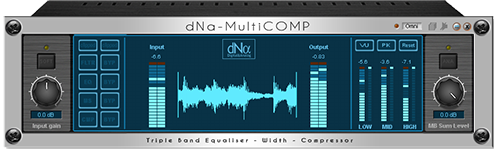
The dNa-MultiCOMP is the dNa take on Multiband Compression!
Highlights:
• 3 band multimode compression with
Easy Selection Matrix
• 3 band pre comp filter/equalising
• 3 band MS widening
• Make Mono feature
• Our RENOWNED ANALOG MODELING
• 96kHz capable
View Hires: Screen
This is a customer Loyalty Gift release - not for sale in Sonic Core shop!
Find out what other users think of dNa plugins @PlanetZ and ScopeRise
Features:
- 3 band compression, with precomp equalising and MS width control over the three bands!
- FF/FB/FBX: Modern or Classic compressor topology as used in our Classic Line, and a special FB mode for more drive.
- Easy Matrix: selecting a "preset" from the matrix with preselected treshold, attack, release and ratio.
- Analog Modus: This gives the signal analogue modeled distortion/coloration which can add excitement to any signal. You can also drive the circuits more with this feature enabled. With this feature enabled the compressor will act as a BRICKWALL-LIMITER as well!
- Phase Alignment Technology; the processed and unprocessed signal stay in phase in other words the bypassed plugin has the same sample-accurate latency as non-bypassed.
- DynamicDSP: dynamic distribution of DSP power and functions which are not used are not loaded onto DSP’s for highly efficient DSP usage.
- Remote controllable through MIDI: Control the parameters for example with an external midi-controller.
- Automation of parameters through MIDI: When you custom assign the device parameters to midi-CC signals(just right click on a parameter), the device sends out MIDI signals which you can "record" in you sequencer, thus you can automate the device.
- Saves in screensets
- Compatible with Scope software v5x and v4x
- Compatible with all Scope hardware, PCI cards and Xite
- 96kHz capable
Specifications/Parameters:
For parameters description, see the manual. Downloadable at bottom of this page.
DSP-Usage:
The dNa-MultiCOMP will use roughly between 1040 ~ 3220 DSP cycles depending on settings on the old 66Mhz SHARC (older CW cards). (Max just over three 66Mhz SHARC)
Version history/Change log:
-v1.0:Release as Loyalty GiftManual:
-Manual for the dNa-MultiCOMP v1.0 >DOWNLOAD< (coming soon)
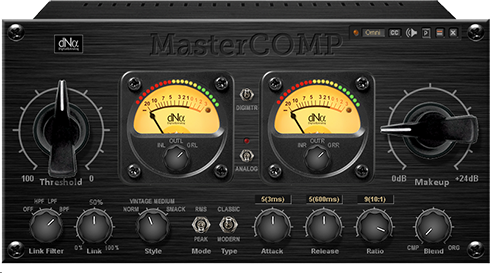
The dNa-MasterCOMP is a Master or Buss Compressor;
Combining the best of both worlds into one unique slamming compressor/limiter!
Highlights:
• Remote controllable with midi
• New / Old style circuit topology
• Blend compressed with original
• Analog drive / Coloration
• Smart sidechain filtering
• 96kHz capable
View Hires: Screen
Click here to visit shop at Sonic Core
Find out what other users think of these plugins @PlanetZ and ScopeRise
User's impressions:
"VERY VERY VERY impressed......stellar."
"The compressor is excellent/top-shelf"
"I really like them...a real bargain IMHO"
"One of the best compressor and eq i have"
Features:
- FF/FB: New or Modern Feed-forward or Old/Classic Feed-back topology as used in renowned analog processors.
- Peak/RMS: The compressor can act on peak energy as well as RMS energy.
- Blend: Blend the compressed with the uncompressed signal; PARALLEL compression!
- Link: Act as two separate compressors(Left and Right) or sum the signal so the compressors act the same. The link function and filters make a more consistent stereo-image possible. If you have a loud sound on one channel you don’t want the other channel compressing the same.
Additonal LINK info: This can be a complex function to understand! This is a feature very handy for for example percussion groups. If you have percussive sounds on the left, you don't want the compressor working on the right channel....or at least not that much. Or....for example a deep sound going from left to right....imagine what this will do if the compressor is fully linked. So....this is where the filtering and link-percentage comes in. - SC Filter: even smarter sidechain filtering for enhanced and more musical compression.
- Analog Modus: This gives the signal analogue modeled distortion/coloration which can add excitement to any signal. You can also drive the circuits more with this feature enabled. With this feature enabled the compressor will act as a BRICKWALL-LIMITER as well!
- Easy setting: 9 preset Attack, Release and Ratio values
- DynamicDSP: dynamic distribution of DSP power and functions which are not used are not loaded onto DSP’s for highly efficient DSP usage.
- Phase Alignment Technology; the processed and unprocessed signal stay in phase in other words the bypassed plugin has the same sample-accurate latency as non-bypassed.
- Remote controllable through MIDI: Control the parameters for example with an external midi-controller.
- Automation of parameters through MIDI: When you custom assign the device parameters to midi-CC signals(just right click on a parameter), the device sends out MIDI signals which you can "record" in you sequencer, thus you can automate the device.
- VU metering, PPM LED metering AND clip-LED for fast transients.
- Large GUI with “analogue-style” big knobs and big meters (also more precise LED-meters), because big knobs just sound better, haha ;-)
- Saves in screensets
- Compatible with Scope software 5x and 4x
- Compatible with all Scope hardware, PCI cards and Xite
- 96kHz capable
Specifications/Parameters:
Threshold: 0 to -60dBFs
Gain Makeup: 0 to +24dB
Attack: ± 50 μs to 50 ms
Release: ± 50 ms to 5.0 s
Ratio: 1.2:1 to 10:1
SC-filter: No filter, Vintage (slight bass roll-off and vintage LP filter), Medium (slight bass roll-off and boosting high frequencies), SMACK! (Special filter)
SC-Mode: New / Modern feed-forward or Old / Classic feed-back
Comp Mode: Peak / RMS
Link: 0-100%
Link filter: Full (No filter), HPF, LPF, BPF
Blend: 0-100% (org-cmp)
Analog: Enable analogue modeling distortion and colorationDSP-Usage:
The dNa-MasterCOMP will use roughly between 765 ~ 1315 DSP cycles depending on settings on the old 60Mhz SHARC (older CW cards). (Max around 130% of one 60Mhz SHARC)
Version history/Change log:
-v1.0: Release, initial release didn't correctly work as insert, but this was fixed within hours.
-v1.1: Added screenset-saving feature. Now part of the dNa Mastering Pack with the dNa-Stereo Equaliser and dNa-CompANY-XT.
-v1.5: Added tooltips; added saving of assigned midiCC
-v1.55: Enhanced GUI
-v2.0: GUI-rework and added Midi CC manager, saves midi assignments with preset
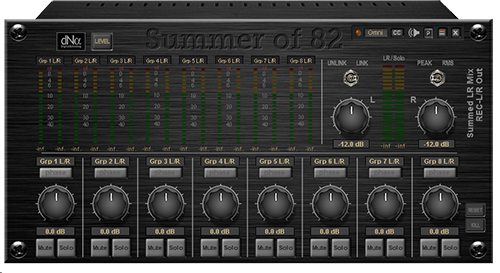
The dNa-Summer of 82 is a smart 8 stereo buss summing to 1 stereo device. Especially created for the ones mixing in DAW-software.
Highlights:
• Remote controllable with midi
• Level/Pan for every buss and the master.
• MS-Widening on EVERY buss!
• Solo-listening on separate Control-room output.
• 96kHz capable
View Hires: Screen 1 / Screen 2
Click here to visit shop at Sonic Core
Why to use?
We made this efficient summing mixer especially for when you are mixing inside your DAW sequencer. Because firstly you don't need big DSP-intensive mixers in Scope when your DAW mixer can perform sub-mixing.
Secondly, you can use Summer of 82 to simplify the mixing phase and keep your projects and settings managable.Thirdly, mixing down to one stereo track exclusively inside your DAW software often sounds bad. Therefore get the best of both worlds. Do your sub-mixing inside your DAW sequencer (to multiple stereo output tracks/groups/stems) and then sum these inside Scope using 'dNa-Summer of 82'. This results in a much richer and better sounding mix; you can fine tune your balance and width of the separate stems. And because this efficiency will save you some DSP, you'll have plenty of DSP headroom to add (for example) our mastering tools - the dNa-Stereo Equaliser and the dNa-MasterCOMP to further finish your mix.
Ideal for BCF2000 users tired of having to switch banks all the time.
Features:
- Sum 8 stereo sources to one stereo bus.
- Link L/R: Left/Right linkable or separately controllable
- Two stereo outputs: one for recording and one for control-room/solo monitoring
- MS-Width functionality on every buss. (widening, narrowing or mono with just 1 knob, and staying mono-compatible!)
- Panning for balance-adjustments
- Reverse Phase
- Solo/Mute function
- Adjust solo level
- Peak / RMS metering for L/R mix
- LED meters for the channels
- Naming your submix channels
- Remote controllable through MIDI: Control the parameters for example with an external midi-controller.
- Automation of parameters through MIDI: When you custom assign the device parameters to midi-CC signals(just right click on a parameter), the device sends out MIDI signals which you can "record" in you sequencer, thus you can automate the device.
- DynamicDSP: dynamic distribution of DSP power and channels/functions which are not used are not loaded onto DSP’s for efficient DSP usage.
- Large GUI with “analogue-style” look and feel.
- Saves in screensets
- Compatible with Scope software 5x and 4x
- Compatible with all Scope hardware, PCI cards and Xite
- 96kHz capable
Specifications/Parameters:
Solo/KS: Adjust solo-level / dis-engage solo (kill solo)
no link/link: unlink/link L/R master level controls
little switch above input-metering: reset level-meter peak-holds
Peak/RMS: switch between peak/rms metering on L/R master output
Level L/R: adjust L/R master level outputs
On all channels 1st layer:
-Phase: Flip the phase of the signal
-Level: Adjust level of the bus/stereo-channel. Watch it though, there is a MS decoder on all channels, attenuating 6dB. So stay at optimum peak level for the channels at -6dB for optimum performance, because otherwise you'll have to attenuate the master outputs more. You will still have to watch the outputs from your DAW not overloading. While you're probably mixing at 24 bit, you don't NEED to drive all the outputs to 0dbFS....try safer margin for more relaxed mixing!
-Mute: Mute the channel in the summing process.
-Solo: Solo the channel for listening on the control-room output
On all channels 2nd layer:
-MS decoder: Makes the stereo-channel mono-narrower-original or wider, make your busses/stereo-channels/stems wider or narrower this way, creating an overall wider mix.
-Pan: Pan the channel in the mixDSP-Usage:
The dNa-Summer of 82 will use around 285 DSP cycles on the old 66Mhz SHARC (older CW cards). (Max around 30% of one 66Mhz SHARC)
Version history/Change log:
-v1.0: Release, BUNDLED with dNa-Super8Tracker in DAW-pack.
-v1.1: Added possibility for naming the channels. Also puts names on top of VU meters.
-v1.5: Added insert rack for masteroutput; Added tooltips; added saving of assigned midiCC
-v1.55: Enhanced GUI
-v1.6: Fixed internal bug, no CR output
-v2.0: GUI-rework and added Midi CC manager, saves midi assignments with preset
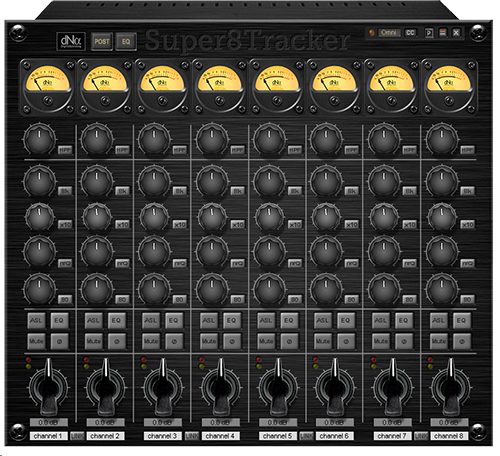
The dNa-Super8Tracker is a smart 8 channel recording processor.
Highlights:
• Remote controllable with midi
• 3-band EQ on every channel
• Integrated High-pass filters
• Analog-style Softclip Limiter (ASL) function
• Intuitive user interface
• 96kHz capable
View Hires: Screen 1 / Screen 2
Click here to visit shop at Sonic Core
Why to use?
We made this processor, because all too often it to complex integrating Scope and the XTC mode in the mixing phase...A lot of users just use Scope hardware as an interface, not using the wonderful sounding plugins from the scope-environment. Therefor the dNa-Super8Tracker is a simple, easy to use and efficient 8-channel processor (for example between the ADAT ports and the ASIO ports when recording) to do some processing at the recording stage: Like in: “If it sounds good, tape it ;-)”
Also ideal for those with a BCF2000, without having to create complex bank switching protocols.
Features:
- Easy-Q: easy-to-access 3 bands equalizers and high-pass filtering(and input-gain) on each channel.
- Direct access of all the important parameters!
- EQ-View: see the EQ curve of every channel in one view (and get small LED meters for monitoring)
- VU style meters: nice vintage-style metering and LED Metering/indicators (pre/post processing)
- ASL: Analog-style softclip limiter; Give the signal some coloration and prevent clipping.
- DynamicDSP: dynamic distribution of DSP power and functions which are not used are not loaded onto DSP’s for highly efficient DSP usage.
- Phase Alignment Technology; the signals stay in phase with one another in other words the bypassed signal has the same sample-accurate latency as non-bypassed.
- Remote controllable through MIDI: Control the parameters for example with an external midi-controller.
- Automation of parameters through MIDI: When you custom assign the device parameters to midi-CC signals(just right click on a parameter), the device sends out MIDI signals which you can "record" in you sequencer, thus you can automate the device.
- Large GUI with “analogue-style” big knobs and big meters (also more precise LED-meters), because big knobs just sound better, haha ;-)
- Saves in screensets
- Compatible with Scope software 5x and 4x
- Compatible with all Scope hardware, PCI cards and Xite
- 96kHz capable
Specifications/Parameters:
Gain/Level: -24 to +24dB (the gain/level stage is AFTER the high-pass filter; this way you can cut your headroom-slurping unwanted low end, and re-gain for your equalizing thus optimizing levels for recording in your DAW-software.
HPF: 30 to 300Hz
LF Shelf Freq: 80, 150 Hz
MF Freq: 80-800 Hz, 800-8k Hz (x10)
MF Q: wide and narrow (wide for color, narrow for filtering)
HF Shelf Freq: 8k, 12k
Gain on all EQ-bands: -12 to +12dB
-HPF bypass, EQ bypass, Mute, Phase, Silk on every channel
-Pre/Post/Show EQ switch
-Enable “ASL” on all channels
-Text-field for naming the channels
-8 channels in, 8 channels out (mono-channels because of phase/dsp-cycles/compatibility)DSP-Usage:
The dNa-Super8Tracker will use roughly between 500 ~ 1925 DSP cycles depending on settings on the old 60Mhz SHARC (older CW cards). (Max almost two 60Mhz SHARC's)
Version history/Change log:
-v1.0: Release, BUNDLED with dNa-Summer-of-82 in DAW-pack
-v1.5: Added tooltips; added saving of assigned midiCC
-v1.55: Enhanced GUI
-v1.56: Solved input 6&7 error. Thanks Dan!
-v2.0: GUI-rework and added Midi CC manager, saves midi assignments with preset
<p> </p>
<h3><a name="index"></a>Question&Answer General:</h3>
<h4><a href="#QA_1">"How to contact?"</a><br /><a href="#QA_2">"Where can i buy the plugins"</a><br /><a href="#QA_3">"Do i need extra hardware for the plugins"</a><br /><a href="#QA_4">"Do the plugins come in native VST versions"<br /></a><a href="#QA_demo">"Can i get a demo of plugin X?"</a><br /><a href="#QA_5">"Compatibility"</a><br /><a href="#QA_5_v4compat">"V4.x compatibility and key requests"</a><br /><a href="#download">"Where can i download the latest versions?"</a></h4>
<h3>Question&Answer Plugin specific:</h3>
<h4><a href="#QA_6">"Analog modus and the Clip-LED; the relationship"</a><br /><a href="#QA_7">"What do the VU / PPM LED / Clip LED Meters show"</a><br /><a href="#QA_8">"GR LED Meter shows full after loading"</a><br /><a href="#QA_9">"Loading v1.0 preset-files on dNa-Stereo Equaliser v1.above states only xx% compatible with this device"</a><br /><a href="#QA_10">"Solo function / Kill solo on Summer of 82 gives a short signal peak on CR-outputs when switching"</a><br /><a href="#QA_11">"Summer of 82 LED channel meters don't show correct values"</a><br /><a href="#QA_18">"Optimus Prime doesn't load certain presets correctly on initial selection"</a><br /><a href="#QA_12">"What is the "Ext" SC Mode on the StereoCOMP or MonoCOMP?"<br /></a><a href="#QA_13">"How much DSP power does plugin x use?"<br /></a><a href="#QA_midicc">"What is the Midi CC manager used for?"</a></h4>
<h3>Question&Answer Problems or bugs:</h3>
<h4><a href="#QA_14">"Where can i find the version history and version number of a plugin"</a><br /><a href="#QA_15">"The plugin doesn't work correctly"</a><br /><a href="#QA_16">"BUG-report"</a></h4>
<p> </p>
<p> </p>
<p> </p>
<p> </p>
<p> </p>
<h2>Question&Answer General:</h2>
<h3><a name="QA_1"></a>"How to contact?" <a href="#index">[top]</a></h3>
<p> At the top of our website are links for getting in touch with us or <br /> use<a href="/dNa.Scope/index.php/contactform/contact"> the mailform here. </a> </p>
<h3><a name="QA_2"></a>"Where can i buy the plugins" <a href="#index">[top]</a></h3>
<p> All plugins can be purchased in the Sonic Core webshop which can be found here:<br /> <strong><a href="http://www.sonic-core.net/shop/index.php?cat=c2_DSP-Plug-ins.html&sort=&XTCsid=9a794668db8d7e2d491ca323e9da1ed7&filter_id=17" target="_blank">Sonic Core Webshop.</a></strong></p>
<h3><a name="QA_3"></a>"Do i need extra hardware for the plugins" <a href="#index">[top]</a></h3>
<p> Yes, these plugins <strong>ONLY</strong> run with dedicated DSP hardware from <strong>Sonic Core</strong> formerly known as Creamware.</p>
<h3><a name="QA_4"></a>"Do the plugins come in native VST versions" <a href="#index">[top]</a></h3>
<p> The plugins can only run in VST/XTC modus with Creamware / Sonic Core DSP hardware. There are no native VST / DX versions. This is also due to the specialized sound processing done by the hardware; hence the name DSP or Digital Sound Processing.</p>
<h3><a name="QA_demo"></a>"Can I get a DEMO of plugin X?" <a href="#index">[top]</a></h3>
<ul>
<li>Install the plugin of your choice from the SC FTP-server or from the ZIP-files listed here</li>
<li>Send the request string to support in an <strong><a href="mailto:
<li>Have fun trying out your plugin</li>
</ul>
<h3><a name="QA_5"></a>"Compatibility" <a href="#index">[top]</a></h3>
<p> Our plugins are designed to be compatible with <strong>Sonic Core's Scope software up to software v5.x</strong>, compatible with <strong>all Scope hardware (the PCI DSP cards made formerly by Creamware and now known as Sonic Core S|C and the Scope Xite system</strong>) and <strong>96kHz capable</strong>, unless otherwise <strong>explicitly stated</strong> in the descriptions.</p>
<h3><a name="QA_5_v4compat"></a>"V4.x compatibility and key requests" <a href="#index">[top]</a></h3>
<p> Most of our plugins are designed also for v4.x compatibility, unless otherwise stated on our product pages. The zip-files provided as a download on <a href="/dNa.Scope/index.php/downloads" target="_self">dNaMusic.nl</a> can also be unpacked to an v4.x installation folder. The executable files available for download on the SC ftp-server are <strong>only</strong> suitable for v5.x.</p>
<p><strong>Therefor; if you have not upgraded your Scope software to fully enjoy all the updated features and plugins you can still buy and use the dNa plugins in Scope. Use our zip-files for install, and you can contact the support of Sonic Core requesting for a v4 key for dNa products. Bear in mind that this is goodwill of Sonic Core since v4.x software(then being Creamware) is outdated and is not supported by Sonic Core. For full support you will need to upgrade your software to v5.x!</strong></p>
<p> </p>
<h2>Question&Answer Plugin specific:</h2>
<h3><a name="QA_6"></a>"Analog modus and the Clip-LED; the relationship" <a href="#index">[top]</a></h3>
<p> When you enable the analog modus the Clip-LED could indicate a sort of "softclip" action.(depending on the circuits) The plugin itself will not overload. With analog modus enabled the signal will be <strong>not higher than around -0,3dBFs</strong>. You can drive the circuits more though with this feature enabled, giving a source a special sound.</p>
<h3><a name="QA_7"></a>"What do the VU / PPM LED / Clip LED Meters show" <a href="#index">[top]</a></h3>
<p> The VU meter shows VU or RMS value. The PPM or Peak Program Meter shows intermediate peak values, with a short peak hold time. The LED / Clip LED shows fast transients the PPM meter does not show, exceeding 0dBFs.</p>
<h3><a name="QA_8"></a>"GR LED Meter shows full after loading" <a href="#index">[top]</a></h3>
<p> After loading a compressor plugin the LED meter (click small button on VU meter) is fully lit by default. There has not been any GR action. As soon as the compressor start working the GR Led meter will show correct.</p>
<h3><a name="QA_9"></a>"Loading v1.0 preset-files on dNa-Stereo Equaliser v1.above states only xx% compatible with this device" <a href="#index">[top]</a></h3>
<p> When you load a v1.0 preset-file into the v1.1 dNa-Stereo Equaliser you will get this message. This is because of the added soloing function (these states can be saved). Just go ahead and load your presets; there should be no further problems. You can overwrite the settings thus fixing this question every time you load the preset-file.</p>
<h3><a name="QA_10"></a>"Solo function / Kill solo on Summer of 82 gives a short signal peak on CR-outputs when switching" <a href="#index">[top]</a></h3>
<p> If you turn the solo-level way up due to the internal structure making the CR-outputs there can be a short signal-peak on the CR-output when switching. Sadly we cannot fix this due to the main software. We tried every trick known trying to fiddle this out...internal switching just costs a small amount of time ;-) Just don't turn the solo level up too much, or turn it back down before "kill solo".</p>
<h3><a name="QA_11"></a>"Summer of 82 LED channel meters don't show correct values" <a href="#index">[top]</a></h3>
<p> The LED Meter of the channels in the Summer of 82 does <strong>NOT</strong> show <strong>INPUT</strong> values. It shows <strong>internal values</strong> from the plugin. <br /><strong>Why?</strong> Because all the channels have a MS matrix(widening, narrowing, mono-sum) in the signal, and because of saving certain modules (read "DSP load") you "loose" a minor 6dB. Because the platform operates at 32 bit, this is no problem. If you have signals on all the channels and if we would insert a make-up stage, the master or LR-mix should attenuate a lot. With this setup, you can attenuate less. So this is a middle-of-the-road solution we deliberately chose.</p>
<h3><a name="QA_18"></a>"Optimus Prime doesn't load certain presets correctly on initial selection" <a href="#index">[top]</a></h3>
<p> When you switch between presets with different "linking-states" of the channels, the preset will not initialize correctly the first time. This can be solved easily by selecting the preset again...then it will load correctly. This is not marked as a bug, since it saves the preset good, and will recall correct if you click on it twice. There is no other solution for this at this moment.</p>
<h3><a name="QA_12"></a>"What is the "Ext" SC Mode on the StereoCOMP or MonoCOMP?" <a href="#index">[top]</a></h3>
<p> This is an option to control a compressor from an external source. This way for example you can compress a bassline whenever you have a kickdrum thumping, this making more room for the kickdrum...but you can use this to do some creative compressing. It's sometimes called "sidechaining" and there should be plenty of tricks on the net to try. We made this in such a way you can even use our filters on the external sidechain.</p>
<h3><a name="QA_13"></a>"How much DSP power does plugin x use?" <a href="#index">[top]</a></h3>
<p> On our/this site you can will find the DSP usage at the bottom of the plugin-pages. We always state the DSP usage as used on the older PCI cards (with only the older 60Mhz SHARC processor chips), because these are the system on which it is more important. The new Xite systems have a lot more processing power. One 60Mhz SHARC processor can "process" 1050 DSP cycles @ 48kHz.</p>
<h3><a name="QA_midicc"></a>"What is the Midi CC Manager used for?" <a href="#index">[top]</a></h3>
<p> This way you can assign the controls of a plugin from an easy to use interface, and it WILL save that in a preset and in projects. This way you can recall settings, along with you assignments much faster. The manager itself is also screenset capable!</p>
<p> </p>
<h2>Question&Answer Problems or bugs:</h2>
<h3><a name="QA_14"></a>"Where can i find the version history and version number of a plugin" <a href="#index">[top]</a></h3>
<p> On our plugins there is the dNa-logo, and if you press this "knob" a popup window appears, where you can find some info of the plugin AND find the version number of that plugin. On our/this site you can find the version-numbers and/or changes in the change log at the bottom of the plugin-pages. This will always be most up to date!</p>
<h3><a name="QA_15"></a>"The plugin doesn't work correctly" <a href="#index">[top]</a></h3>
<p> First of all: you need a registered key from Sonic Core enabling the plugin. Else NO SOUND. In other scenarios it could be that in big / heavy DSP load projects you can get DSP/PCI overload. First try reloading the DSP's or removing the plugin the plugin and reloading it to correct the problems. <strong>All our plugins were intensively tested minimizing the chance for bugs or anomalies.</strong> If you still think something is wrong; please write us a <a href="/dNa.Scope/index.php/contactform/contact">mail</a> with the problem your having.</p>
<h3><a name="QA_16"></a>"BUG-report" <a href="#index">[top]</a></h3>
<p> <strong>All our plugins were intensively tested minimizing the chance for bugs or anomalies.</strong> If you think something is wrong or you have found any bug; we apologize for any inconveniences and please write us a mail with the problem your having. We'll get on it as soon as possible, because we want to provide service as good and fast as possible!</p>
<h3><a name="download"></a>"Download latest versions at dNaMusic.nl > Downloads" <a href="#index">[top]</a></h3>
<p><strong>Please consider/check this in advance: First: always use the latest version of the plugin you purchased <a href="/dNa.Scope/index.php/downloads" target="_self">HERE</a> or </strong><strong><strong>from the <a href="ftp://ftp.sonic-core.net/software/3rd_party/dna/" target="_blank">ftp-server at Sonic Core</a>) </strong>and second: you need a registered key from Sonic Core enabling the plugin. Else NO SOUND. In other scenarios first try reloading the DSP's or removing the plugin the plugin and reloading it to correct possible problems.</strong></p>
<p> </p>